
Automated Bank Reconciliation Software for Indian Businesses
Bank reconciliation in India today is a fundamentally different challenge from what it was five years ago and very different from what reconciliation software designed for Western markets is built to handle.
A typical Indian business today receives payments through at least four or five channels simultaneously: NEFT/RTGS transfers (which appear in bank statements with truncated narrations), UPI collections (which may show the payer's VPA, phone number, or just a transaction reference depending on the bank), Razorpay or Cashfree settlements (which arrive as net credits after fee deductions, covering multiple orders), Amazon or Flipkart payouts (weekly, with returns netted off), and direct bank transfers from customers who may use any reference in the narration field.
Each of these channels settles differently. Each appears in a bank statement differently. And each needs to be matched to a specific invoice, customer account, or ledger entry in the books.
At 100 transactions a month, this is manageable manually. At 800–1,000 transactions across multiple accounts and channels, it's a multi-day exercise every single month. Automated bank reconciliation software built for Indian payment channels changes this from a week-long effort to a matter of hours.
This is where Automated Bank Reconciliation Software helps. By automating transaction matching, identifying exceptions, and streamlining reconciliation workflows, solutions such as Flick AI help businesses reduce manual effort, improve accuracy, and maintain greater financial visibility as they scale.
What Is Automated Bank Reconciliation Software?
Bank reconciliation is the process of comparing transactions recorded in a business's accounting records with transactions reflected in its bank statements. The objective is to ensure that all financial activity has been accurately recorded and that any discrepancies are identified and resolved promptly.
Traditionally, bank reconciliation involves manually matching deposits, payments, transfers, fees, refunds, and other transactions against accounting records. Finance teams must review bank statements, identify unmatched entries, investigate timing differences, and verify that transactions have been recorded correctly. While this process may be manageable for businesses with low transaction volumes, it often becomes increasingly time-consuming as financial activity grows.
One of the biggest challenges with manual reconciliation is identifying missing transactions, duplicate entries, unmatched payments, and discrepancies across multiple accounts or payment channels. As businesses begin processing larger numbers of customer payments, vendor transactions, UPI collections, and payment gateway settlements, maintaining accuracy through manual reviews can become difficult.
Automated Bank Reconciliation Software helps streamline this process by automatically matching transactions, identifying exceptions, highlighting discrepancies, and reducing the amount of manual effort required during reconciliation. This enables finance teams to complete reconciliations faster, improve accuracy, and maintain greater confidence in their financial records as transaction volumes increase. These reconciliation workflows often work alongside AI Bookkeeping Software to help businesses maintain accurate and organized financial records.
Why Manual Bank Reconciliation Becomes Difficult as Businesses Grow
Manual bank reconciliation may work effectively when transaction volumes are relatively low and financial activity is concentrated within a limited number of accounts. However, as businesses grow, reconciliation complexity often increases much faster than expected. Additional payment channels, higher transaction volumes, multiple bank accounts, customer collections, and vendor payments create significantly more records that must be matched accurately before financial reports can be finalized.
Payment Gateway Settlement Reconciliation
This is the reconciliation challenge unique to businesses that sell online, and it's one of the most poorly handled by generic reconciliation software. When Razorpay settles ₹2,43,750 to your bank account on a Tuesday, that single credit represents:
87 individual customer orders
Less Razorpay processing fees (typically 2% of transaction value)
Less any refunds processed in that settlement period
Possibly spanning orders from 2–3 different days depending on the settlement cycle
Payment gateway settlement work
Reconciling that single bank credit requires breaking it into 87 individual accounting entries, each matched to a specific customer invoice, minus the fee allocation, net of any refunds. Manually, this process takes 3–4 hours for a single settlement. A business with daily settlements from two or three gateways is spending significant finance team time on this task alone every week.
Automated reconciliation tools that can parse gateway settlement reports (Razorpay, Cashfree, PayU all provide downloadable reports) and map them to individual order-level accounting entries eliminate this entirely.
UPI Collections
UPI is the reconciliation challenge that most Indian businesses underestimate until they're dealing with it at scale. Here's the specific problem: UPI narrations in bank statements vary by bank, by the payer's app, and sometimes by the transaction amount. The same customer paying through PhonePe from an HDFC account shows up differently than the same customer paying through Google Pay from an Axis account. Manual matching requires looking up each transaction individually. At 200–300 UPI collections a month, this consumes 8–12 hours of finance team time. Automated reconciliation resolves known customers by VPA pattern and amount, queuing only genuinely unidentifiable transactions for manual review. Many businesses use dedicated Bank Reconciliation Software workflows to simplify transaction matching across multiple payment channels.
Payment Gateways
Businesses using payment gateways often receive transactions through multiple settlement cycles, deductions, fees, and adjustments. Reconciling customer payments against settlement reports and bank credits can require substantial manual effort, particularly when transaction volumes continue to increase. Businesses processing large numbers of invoices and collections often combine reconciliation workflows with AI Invoice Parsing Software to reduce manual financial data processing.
Refunds and Chargebacks
Refunds create two reconciliation challenges: the original transaction needs to be reversed in the books, and the refund needs to be matched to a bank debit (if the refund was processed directly) or netted against a settlement (if the gateway handled it). Chargebacks add further complexity because they may appear weeks after the original transaction, requiring the original entry to be located and reversed. Both scenarios require a complete and searchable transaction history which manual reconciliation, especially spreadsheet-based, rarely provides.
NACH/ECS Mandates and Recurring Payments
Businesses with subscription models or EMI collections often use NACH mandates or ECS for recurring deductions. These appear in bank statements as automated debits with reference codes that don't immediately identify the customer. Reconciling NACH collections requires matching the bank debit to the mandate record, the customer account, and the invoice, a three-step match that's straightforward to automate but extremely tedious to do manually at scale.
Month-End Bottlenecks
Many businesses experience their greatest reconciliation challenges during month-end closing periods. Finance teams are often required to review large volumes of transactions, investigate discrepancies, reconcile accounts, and prepare reports within tight timelines. As financial activity grows, month-end reconciliation can quickly become a bottleneck that delays reporting and reduces financial visibility. Many organizations also adopt AI Bookkeeping Software to reduce month-end workload and maintain organized financial records.
Common Reconciliation Challenges Businesses Face
As transaction volumes increase, reconciliation challenges often become more frequent and time-consuming. While the nature of these challenges varies across businesses, several issues consistently appear in finance workflows and can significantly impact reporting accuracy and operational efficiency.
Missing Transactions
One of the most common reconciliation challenges is identifying transactions that appear in bank statements but are missing from accounting records, or vice versa. Missing transactions can occur due to delayed recording, manual data entry errors, or incomplete financial records. If not identified promptly, these discrepancies can affect account balances, financial reports, and decision-making.
Duplicate Transactions
Duplicate entries can occur when transactions are recorded more than once across accounting systems, spreadsheets, payment platforms, or banking records. These duplicates often lead to inaccurate balances and require additional investigation before accounts can be finalized. As transaction volumes increase, identifying duplicate records manually becomes increasingly difficult.
Timing Differences
Not all transactions appear in accounting records and bank statements at the same time. Settlement delays, pending transactions, payment processing timelines, and banking cut-off periods frequently create timing differences. While these differences are often legitimate, finance teams must identify and verify them to ensure account balances remain accurate.
Unmatched Payments
Businesses frequently receive customer payments that cannot be immediately linked to invoices, orders, or accounting records. Unmatched payments often require manual investigation to determine their source and purpose. As customer volumes increase and payments arrive through multiple channels, resolving unmatched transactions can consume significant finance team time.
Multiple Settlement Sources
Modern businesses often collect payments through bank transfers, UPI, payment gateways, QR codes, marketplaces, and subscription platforms. Each source may have different settlement timelines, fees, adjustments, and reporting formats. Reconciling transactions across multiple settlement sources can become increasingly complex as business operations expand. Businesses processing high volumes of settlements often adopt Automated Bank Reconciliation Software to simplify transaction matching across multiple collection channels.
Spreadsheet Dependency
Many businesses continue relying on spreadsheets for reconciliation long after transaction volumes have outgrown manual processes. While spreadsheets can be useful in the early stages, they often create version control issues, increase the risk of manual errors, and require significant effort to maintain. As reconciliation workloads increase, spreadsheet-based workflows frequently become a bottleneck for finance teams and reporting processes. Many growing businesses also implement AI Bookkeeping Software to reduce manual record management and improve month-end readiness.
How Automated Bank Reconciliation Software Works
As transaction volumes increase, manually matching bank transactions against accounting records becomes increasingly difficult. Automated Bank Reconciliation Software helps streamline this process by collecting financial data, matching transactions, identifying exceptions, and reducing the manual effort required to maintain accurate records. Flick AI is designed to help businesses simplify reconciliation workflows and improve financial visibility as they scale.
Step 1: Import from all channels simultaneously
Reconciliation starts with data from multiple sources: bank statements from each account (which need to be downloaded separately for each bank), payment gateway settlement reports (Razorpay, Cashfree, PayU each with a different column structure), marketplace payout reports (Amazon, Flipkart), and accounting records from the books. Flick AI imports and normalizes all of these into a single reconciliation workspace.
Step 2: Normalize transaction formats
Bank statement formats vary by bank. SBI statements look different from HDFC statements. ICICI's format differs from Kotak's. Payment gateway reports have their own column structures. Before matching can happen, all of these need to be normalized into a common format. This normalization step is invisible to the user but essential, it's what allows the system to compare a Razorpay report against a bank statement against an accounting entry without manual reformatting.
Step 3: Three-way matching: books, bank, and payment channel
Standard reconciliation matches bank entries against books (two-way). For businesses with payment gateways, a third leg is essential: the gateway report. A sale recorded in the books needs to match both the gateway transaction record and the bank settlement credit. Three-way matching catches errors that two-way matching misses such as a gateway transaction that was recorded in books but never settled to the bank (a gateway dispute or hold).
Step 4: Exception categorization
Not all unmatched transactions are problems. Some are timing differences (a payment received on the last day of the month that settles next month). Some are legitimate adjustments (gateway fees, bank charges). Some are genuine discrepancies (a payment received but not recorded in books). The system categorizes exceptions so the review queue shows timing differences separately from genuine discrepancies reducing false positives in the exceptions list.
Step 5: Guided exception resolution
Finance teams review the exception list rather than the full transaction set. Each exception shows the relevant context: the bank entry, the closest matching accounting record, and suggested resolution options. For timing differences, the system suggests the period adjustment. For bank charges, it suggests the appropriate expense account. For genuine missing entries, it creates a draft journal entry for review and posting.
Step 6: Reconciliation sign-off and audit trail
Once exceptions are resolved, the reconciliation is marked complete for that period and account. Every matched transaction, every exception resolution, and every manual adjustment is logged with timestamp and user attribution creating a complete reconciliation audit trail that can be produced during a GST audit, statutory audit, or bank review without any additional work. These reconciliation workflows also form an important part of a broader AI Accounting Software ecosystem that helps businesses automate financial operations and maintain greater visibility into business performance.
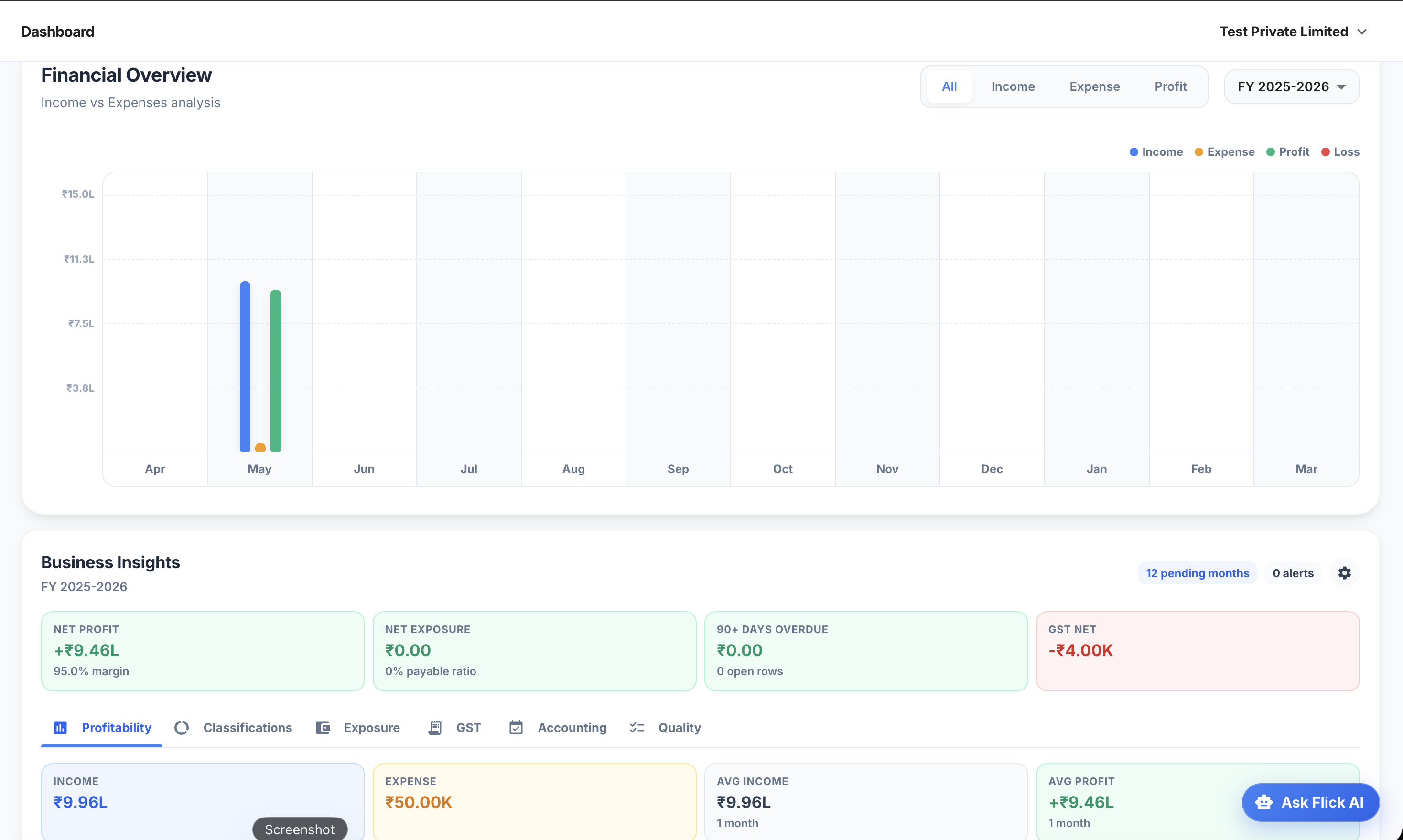
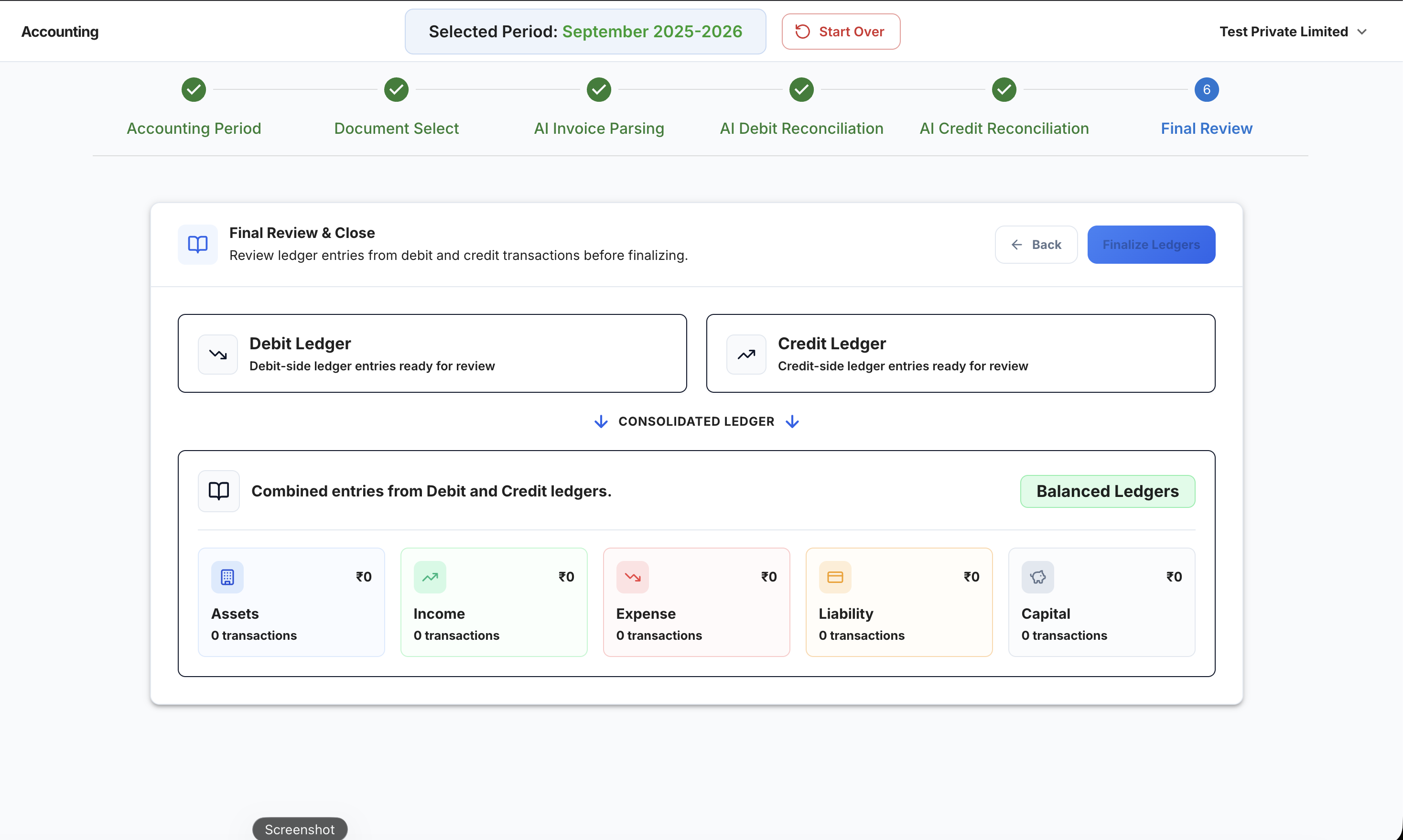
Product proof
Screens from the Flick AI workflow
.png)
.png)
Reconciliation Challenges Specific to Indian Payment Channels
HDFC vs SBI vs ICICI Bank Statement Formats
One of the practical challenges of bank reconciliation in India that no software vendor discusses openly: every major bank exports its statement in a different format, with different column names, different date formats, different narration structures, and different handling of debit/credit signs. A reconciliation tool that handles HDFC Smart Statement exports well may struggle with SBI's format. Flick AI has been built and tested on statement formats from HDFC, ICICI, SBI, Axis, Kotak, Yes Bank, and IndusInd Bank without requiring manual reformatting before import.
Dealing with Incomplete UPI Narrations
UPI transaction narrations in bank statements are notoriously inconsistent. The same bank may show UPI transactions differently depending on the payment app used. Some narrations include the payer's mobile number; some include the VPA; some show only a transaction ID. This inconsistency is the primary reason UPI reconciliation is done manually in most businesses because a rule-based matching system can't handle the narration variability. AI-based reconciliation handles this by matching on multiple signals simultaneously: amount, approximate date, and narration pattern not just exact narration text.
Net Settlements vs Gross Settlements
Payment gateways settle on a net basis: they deduct their fees before remitting to your bank account. This means the bank credit you receive is never exactly equal to the sum of the transactions in the settlement period. When reconciling, the gross transaction value needs to be recorded as revenue, and the gateway fee deducted as an expense not just the net credit amount. This fee allocation step is where many businesses either skip the entry (understating expenses) or make errors (allocating fees to the wrong expense account). Automated settlement reconciliation handles this fee split automatically for each settlement.
Key Benefits of Automated Bank Reconciliation Software
Faster Reconciliation
Manual reconciliation often requires finance teams to review and match transactions individually across bank statements, accounting records, payment gateways, and collection channels. As transaction volumes increase, this process can become increasingly time-consuming. Automated Bank Reconciliation Software helps accelerate transaction matching and exception identification, allowing businesses to complete reconciliations significantly faster. This enables finance teams to spend less time on repetitive tasks and more time analyzing financial information and supporting business decisions.
Reduced Manual Effort
One of the primary benefits of reconciliation automation is the reduction in repetitive manual work. Instead of manually reviewing every transaction, finance teams can focus on investigating exceptions and resolving genuine discrepancies. Automated workflows help reduce spreadsheet dependency and minimize the effort required to maintain accurate financial records. As businesses grow, reducing manual reconciliation effort becomes increasingly important for maintaining efficiency without proportionally increasing finance workloads.
Improved Accuracy
Manual reconciliation processes are often vulnerable to data entry errors, missed transactions, duplicate entries, and oversight caused by large transaction volumes. Automated reconciliation workflows help improve consistency by systematically matching transactions and highlighting discrepancies that require review. While human oversight remains important, automation can help businesses maintain more reliable financial records and reduce the likelihood of reconciliation-related reporting issues.
Faster Month-End Closing
Month-end closing often depends heavily on the completion of reconciliation activities. Delays in matching transactions, investigating discrepancies, or validating account balances can postpone reporting and reduce financial visibility. Automated Bank Reconciliation Software helps accelerate reconciliation workflows, enabling businesses to finalize books more efficiently and prepare management reports sooner. Faster month-end closing provides leadership teams with more timely access to financial information and business performance metrics.
Better Financial Visibility
Accurate reconciliation forms the foundation of reliable financial reporting. When transactions are reconciled promptly and consistently, businesses gain better visibility into cash balances, collections, payments, receivables, payables, and overall financial performance. This allows founders, finance teams, and management to make decisions using up-to-date financial information rather than relying on incomplete or delayed data.
Scalable Finance Operations
As businesses grow, transaction volumes often increase far faster than finance team capacity. Processes that work well at 100 transactions per month may become difficult to manage at 1,000 or 5,000 transactions per month. Automated reconciliation workflows help finance operations scale more effectively by reducing the amount of manual effort required for transaction matching and review. This allows businesses to support growth without creating reconciliation bottlenecks that impact reporting timelines and operational efficiency.
Automated Bank Reconciliation vs Manual Reconciliation
Many businesses initially manage reconciliation manually using bank statements, spreadsheets, and accounting records. While manual reconciliation can be effective for businesses with low transaction volumes, it often becomes increasingly difficult as transaction activity grows. Automated Bank Reconciliation Software helps streamline transaction matching, identify discrepancies more efficiently, and support faster financial reporting. The comparison below highlights some of the key differences between manual and automated reconciliation workflows.
Neither approach is inherently right or wrong. For businesses processing relatively low transaction volumes, manual reconciliation may continue to work effectively. However, as organizations begin managing multiple bank accounts, UPI collections, payment gateways, customer payments, and vendor transactions, automated reconciliation workflows often provide greater efficiency, accuracy, and scalability.
Manual vs automated reconciliation workflows
| Area | Manual reconciliation | Automated reconciliation |
|---|---|---|
| Transaction matching | Finance teams review and match transactions individually across bank statements, accounting records, payment gateways, and collection channels. | Automated Bank Reconciliation Software helps accelerate transaction matching and exception identification. |
| Exception review | Unmatched payments, timing differences, duplicates, and settlement discrepancies require manual investigation. | Finance teams can focus on investigating exceptions and resolving genuine discrepancies. |
| Month-end closing | Delays in matching transactions, investigating discrepancies, or validating account balances can postpone reporting. | Automated workflows help businesses finalize books more efficiently and prepare management reports sooner. |
| Scalability | Processes that work well at 100 transactions per month may become difficult to manage at 1,000 or 5,000 transactions per month. | Automation reduces the amount of manual effort required for transaction matching and review as volumes grow. |
Transaction matching
Manual reconciliation
Finance teams review and match transactions individually across bank statements, accounting records, payment gateways, and collection channels.
Automated reconciliation
Automated Bank Reconciliation Software helps accelerate transaction matching and exception identification.
Exception review
Manual reconciliation
Unmatched payments, timing differences, duplicates, and settlement discrepancies require manual investigation.
Automated reconciliation
Finance teams can focus on investigating exceptions and resolving genuine discrepancies.
Month-end closing
Manual reconciliation
Delays in matching transactions, investigating discrepancies, or validating account balances can postpone reporting.
Automated reconciliation
Automated workflows help businesses finalize books more efficiently and prepare management reports sooner.
Scalability
Manual reconciliation
Processes that work well at 100 transactions per month may become difficult to manage at 1,000 or 5,000 transactions per month.
Automated reconciliation
Automation reduces the amount of manual effort required for transaction matching and review as volumes grow.
Bank Reconciliation for Different Businesses
While reconciliation is important for every organization, the challenges businesses face often vary depending on their transaction patterns, payment channels, customer behavior, and operational structure. Understanding these differences can help businesses build more effective reconciliation workflows.
Startups
Startups often experience rapid increases in transaction volumes as they grow. Multiple bank accounts, employee reimbursements, vendor payments, recurring software subscriptions, investor reporting requirements, and customer collections can quickly increase reconciliation complexity. Many startups initially rely on spreadsheets but often find reconciliation becoming increasingly time-consuming as transaction volumes cross a few hundred entries per month. Many growing startups eventually adopt Accounting Software for Startups India to improve financial visibility and reporting readiness.
E-commerce Businesses
E-commerce businesses frequently receive payments through multiple channels, including payment gateways, marketplaces, UPI, wallets, and direct bank transfers. Settlement delays, gateway fees, refunds, chargebacks, and marketplace adjustments create additional reconciliation challenges. Matching customer orders, settlement reports, and bank credits accurately often requires significant effort when performed manually.
SaaS Companies
SaaS businesses typically manage recurring subscription payments, payment gateway collections, international transactions, refunds, and revenue recognition processes. As subscription volumes grow, finance teams must reconcile recurring billing activity against actual collections and settlement records. Maintaining accurate reconciliation is important for understanding revenue performance and customer payment behavior.
Service Businesses
Service businesses often manage project-based invoicing, milestone payments, retainers, and customer collections across different timelines. Delayed payments, partial collections, and multiple outstanding invoices can create reconciliation challenges that affect cash flow visibility and financial reporting accuracy.
Accounting Firms
Accounting firms frequently manage reconciliation activities across multiple clients, each with different banking arrangements, transaction volumes, and reporting requirements. Manual reconciliation processes can become difficult to scale as client portfolios grow. Automated reconciliation workflows help accounting teams improve efficiency, maintain consistency, and reduce the time spent on repetitive transaction matching activities.
Signs Your Business Needs Automated Reconciliation
Manual reconciliation can work effectively for businesses with limited financial activity. However, as transaction volumes increase and payment processes become more complex, reconciliation often starts consuming a disproportionate amount of finance team time. If several of the situations below sound familiar, it may be a sign that your business has outgrown manual reconciliation workflows.
Your business processes more than 500 transactions each month.
You operate multiple bank accounts for collections, payments, payroll, or business operations.
A significant portion of customer payments are received through UPI channels.
You regularly reconcile Razorpay, Cashfree, Stripe, PayU, or other payment gateway settlements.
Month-end closing is frequently delayed because reconciliations are not completed on time.
Reconciliation activities take several days each month to complete.
Finance teams spend significant time matching transactions manually.
Multiple spreadsheets are used to track payments, settlements, and account balances.
Unmatched transactions frequently require investigation and follow-up.
Financial reports are often delayed because account balances cannot be finalized quickly.
How Flick AI Helps Simplify Bank Reconciliation
As businesses grow, reconciliation often becomes one of the most time-consuming finance activities. Increasing transaction volumes, multiple collection channels, payment gateway settlements, and growing reporting requirements can significantly increase the effort required to maintain accurate financial records. Flick AI helps businesses streamline reconciliation workflows by reducing manual effort, improving visibility, and accelerating the review process. Businesses looking to reduce manual accounting effort can also explore our AI Bookkeeping Software solutions, which help maintain organized financial records and improve reconciliation readiness.
Automated Transaction Matching
One of the most repetitive aspects of reconciliation is matching transactions across bank statements, accounting records, payment gateways, and financial systems. Flick AI helps automate transaction matching, allowing finance teams to process large transaction volumes more efficiently while reducing the time spent on manual reviews.
Exception Identification and Handling
Not every transaction matches perfectly. Missing entries, duplicate records, settlement differences, timing gaps, refunds, and chargebacks often require investigation. Flick AI helps identify reconciliation exceptions quickly, enabling finance teams to focus their attention on transactions that genuinely require review rather than manually inspecting every transaction.
Faster Review Workflows
Instead of reviewing thousands of transactions individually, finance teams can focus on unmatched items and reconciliation exceptions. By reducing the volume of transactions requiring manual attention, Flick AI helps accelerate reconciliation workflows and improve operational efficiency across finance functions.
Improved Reporting Readiness
Accurate reconciliation is an important foundation for reliable financial reporting. Flick AI helps businesses maintain reconciliation-ready financial records, enabling faster month-end closing, more efficient reporting processes, and improved confidence in financial information used for decision-making.
Better Financial Visibility
When reconciliations are completed consistently and efficiently, businesses gain better visibility into cash balances, customer collections, vendor payments, receivables, payables, and overall financial performance. Flick AI helps provide finance teams and business leaders with access to more reliable financial information, supporting faster and more informed business decisions. As part of a broader AI Accounting Software workflow, reconciliation automation helps improve visibility into cash flow, collections, expenses, and overall financial performance.