
Introduction
This comparison is not about which approach is "better", it's about which approach fits which stage of a business.
Traditional accounting, manual bookkeeping, CA-managed ledgers, spreadsheet reconciliation is not broken. For a business processing 50–80 transactions a month, it's perfectly adequate. The problems start when that business reaches 400–500 monthly transactions, adds UPI collections and payment gateway settlements, brings on 15+ vendors, and needs monthly reporting for investors or management.
At that point, traditional workflows don't fail because accountants are bad at their jobs. They fail because the workflow was designed for a different transaction volume and a different reporting frequency. This is particularly common among growing startups that eventually require Accounting Software for Startups India to support increasing transaction volumes.
This guide compares AI and traditional accounting across the dimensions that actually matter for a growing Indian business: cost, time, accuracy, GST readiness, reconciliation complexity, and founder visibility.
What Is Traditional Accounting?
Traditional accounting is the process of recording, organizing, and reviewing financial transactions through manual bookkeeping, spreadsheets, and human oversight. For many businesses, it has been the foundation of financial management, supporting accurate recordkeeping, financial reporting, and compliance requirements.
A typical workflow involves transaction categorization, invoice management, periodic bank reconciliations, and financial reporting, with finance teams and accountants spending significant time on data entry, reviewing records, and ensuring accuracy before reports are finalized.
In the Indian context, traditional accounting typically involves a combination of internal bookkeeping (often in Tally or Excel), monthly data transfer to a CA firm, and periodic reconciliations done during advance tax or filing periods. This structure works well when transaction volumes are low and reporting requirements are limited to annual statutory compliance. The weaknesses become visible when management needs monthly visibility, when GST filings require real-time invoice data, or when payment channels multiply beyond what a monthly bank statement review can handle.
One nuance worth naming: in India, "traditional accounting" often means two parallel systems — the internal records (Tally entries, Excel sheets, WhatsApp invoice folders) and the CA-maintained books prepared for compliance. These two systems frequently diverge. Internal records are updated reactively; CA books are prepared periodically. When a founder asks "what did we spend on marketing last quarter," the answer may not exist in either system in a clean, retrievable form. This divergence between operational records and compliance records is one of the primary reasons growing businesses lose financial visibility even when they have a capable CA firm.
What Is AI Accounting Software?
AI Accounting Software is a modern approach to managing accounting and bookkeeping processes using automation and intelligent data processing. Unlike traditional accounting workflows that rely on manual data entry and repetitive tasks, AI bookkeeping software helps businesses automate routine financial operations, improving efficiency and reducing administrative work.
Modern automated accounting software can process invoices, categorize transactions, reconcile bank accounts, track receivables and payables, and generate financial reports with minimal manual effort. This helps businesses reduce errors, improve reporting accuracy, and access financial information faster.
A key advantage of accounting automation software is its ability to handle growing transaction volumes without a proportional increase in manual effort, allowing accounting teams to focus on financial insights rather than repetitive tasks.
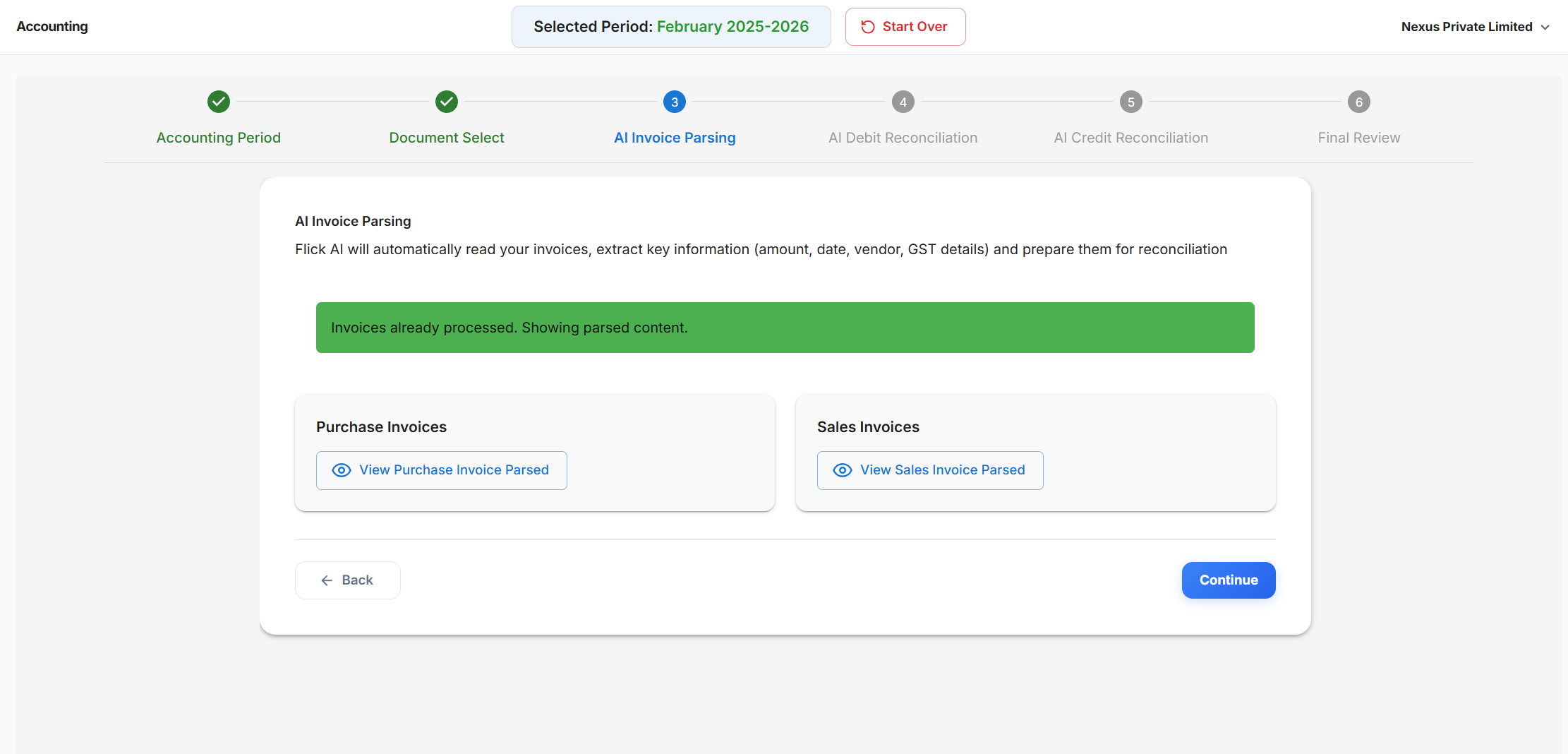
Platforms like Flick AI support this shift by automating bookkeeping, bank reconciliation, invoice processing, and financial reporting workflows, giving finance teams and founders better visibility into their financial operations.
Why Traditional Accounting Workflows Become Difficult as Businesses Scale
Traditional accounting works well in the early stages when transaction volumes are low and financial records are manageable. As businesses grow, the volume and complexity of financial data increases, making manual accounting workflows harder to manage efficiently.
Growing Transaction Volumes
Traditional approach: More transactions mean more manual data entry hours. A business going from 100 to 500 monthly transactions typically needs to add bookkeeping capacity either more hours from the internal team or a larger retainer with the CA firm.
AI approach: Transaction volume increases without a corresponding increase in manual work because extraction and categorization are automated. The human review step stays roughly constant because you're reviewing exceptions, not every transaction.
Multiple Bank Accounts
Traditional approach: Each bank account requires its own reconciliation downloading a separate statement, reviewing line by line, matching against books. For a business with 3 accounts processing 400 combined transactions a month, this is a 2–3 day exercise. Inter-account transfers create a further complication: they appear in both statements and must be excluded to avoid double-counting.
AI approach: Statements from multiple accounts are imported simultaneously and reconciled against one set of books. Inter-account transfers are identified and excluded automatically. The finance team sees one unified exception list rather than three separate worksheets.
Payment Gateways and Digital Collections
Traditional approach: A Razorpay or Cashfree settlement arrives as a net credit — one number representing 50–200 individual customer transactions, minus fees, minus refunds. Manually reconciling that net credit back to individual invoices requires downloading the settlement report, matching each transaction, allocating fee deductions, and making journal entries. For a business with daily settlements across two gateways, this is 4–6 hours of work per week.
AI approach: Settlement reports from Razorpay, Cashfree, and PayU are imported and parsed at the transaction level. Orders are matched to invoices. Fees are allocated as operating expenses. The net bank credit reconciles to the sum of matched transactions automatically.
UPI Collections
Traditional approach: UPI transactions appear in bank statements with varying narration formats depending on the bank and the sender's UPI handle. Matching these to invoices requires manually searching customer records for each transaction often taking 10–15 minutes per unrecognized payment. For businesses with 100+ UPI collections per month, this alone can consume 2–3 hours.
AI approach: UPI transactions are matched to outstanding invoices using amount, approximate timing, and customer pattern recognition unmatched items are flagged for human review rather than requiring manual investigation of every transaction.
Vendor Payments and Accounts Payable
Traditional approach: Vendor invoice management lives across three places: emails (where invoices arrive), a spreadsheet (where payments are tracked), and the CA's books (where entries are made). These rarely stay synchronized. A payment made yesterday may not be in the books until the CA's next update. An invoice that arrived by WhatsApp may be in neither. The result: true payables position requires manually reconciling all three sources typically 2–3 hours before any significant payment run.
AI approach: Invoices are captured as they arrive, regardless of channel. Approved payments update payables automatically. The payables ledger reflects actual outstanding invoices, due dates, and amounts without manual aggregation.
Customer Collections and Accounts Receivable
Traditional approach: AR management typically means a manually-updated Excel sheet. The problem isn't maintaining it, it's keeping it current. Every incoming UPI payment, NEFT credit, or partial payment requires someone to locate the invoice, verify the amount, and update the record. For businesses with 40–60 active customers, this takes 45–60 minutes every day. When it doesn't get done daily, the AR position is always outdated.
AI approach: Incoming payments are automatically matched to outstanding invoices as they arrive. The AR aging report is always current because matching happens continuously, not during a weekly manual update.
Financial Reporting Delays
Traditional approach: Generating a P&L requires a sequential process: collect bank statements (1–2 days), reconcile gateway settlements (1–2 days), gather vendor invoices (1–2 days), send to CA and wait (3–5 days), review draft financials (1–2 days). Total: 8–14 working days after month-end before a usable P&L exists. By which point it's already 3–4 weeks old.
AI approach: Because data is organized as it flows in throughout the month, report generation becomes a pull rather than a pipeline. The data collection step — which accounts for 60–70% of reporting lag is eliminated. Reports can be generated within 1–2 days of month-end.
Founder Visibility Challenges
Traditional approach: A founder who wants their current cash position on a Wednesday afternoon has to call someone and wait, or open 3–4 systems manually. Current bank balance requires logging into the bank. Outstanding receivables require opening the AR spreadsheet. None of these are connected, and none reflect transactions from the last 48–72 hours unless someone has manually updated them.
AI approach: Because transactions are processed continuously, a dashboard showing cash, receivables, payables, and burn rate reflects the current state not the state as of whenever data was last collected manually.
GST and Compliance Requirements
Traditional approach: GST data is typically assembled by the CA firm at filing time, pulling from Tally exports, invoice folders, and bank statements. If invoices are missing or miscategorized, the ITC calculation is wrong and corrections require re-filing or responding to GSTN notices.
AI approach: GST data is captured at the point of invoice processing GSTIN, HSN/SAC, tax amounts, and supplier details are extracted and validated as each invoice enters the system. ITC reconciliation against GSTR-2B can be done monthly rather than quarterly.
AI Accounting Software vs Traditional Accounting
The differences between AI and traditional accounting aren't uniform — they're most significant in specific dimensions. Here's how they compare across the 8 dimensions that matter most for a growing Indian business.
One dimension where traditional accounting retains a genuine advantage: CA and auditor familiarity. Most CAs have worked with Tally for years. AI accounting platforms require a period of verification and trust-building with your CA. Plan for a 1–2 month parallel-run period when transitioning.
AI Accounting Software vs Traditional Accounting: 8-Dimension Comparison
| Dimension | Traditional accounting | AI accounting software |
|---|---|---|
| Reconciliation time | Each bank account requires its own reconciliation downloading a separate statement, reviewing line by line, matching against books. | Statements from multiple accounts are imported simultaneously and reconciled against one set of books. |
| GST accuracy | GST data is typically assembled by the CA firm at filing time, pulling from Tally exports, invoice folders, and bank statements. | GST data is captured at the point of invoice processing GSTIN, HSN/SAC, tax amounts, and supplier details are extracted and validated as each invoice enters the system. |
| Reporting lag | Total: 8–14 working days after month-end before a usable P&L exists. By which point it's already 3–4 weeks old. | Reports can be generated within 1–2 days of month-end. |
| Cost at scale | A business going from 100 to 500 monthly transactions typically needs to add bookkeeping capacity either more hours from the internal team or a larger retainer with the CA firm. | Transaction volume increases without a corresponding increase in manual work because extraction and categorization are automated. |
| Founder visibility | A founder who wants their current cash position on a Wednesday afternoon has to call someone and wait, or open 3–4 systems manually. | Because transactions are processed continuously, a dashboard showing cash, receivables, payables, and burn rate reflects the current state not the state as of whenever data was last collected manually. |
| Audit readiness | If invoices are missing or miscategorized, the ITC calculation is wrong and corrections require re-filing or responding to GSTN notices. | AI invoice processing that captures GST fields from source documents at the point of entry significantly reduces the risk of ITC reversals and GSTN notices. |
| CA workflow | In the Indian context, traditional accounting typically involves a combination of internal bookkeeping (often in Tally or Excel), monthly data transfer to a CA firm, and periodic reconciliations done during advance tax or filing periods. | Talk to your CA before switching about what format they need for compliance work: Tally import file, trial balance format, specific ledger groupings. |
| Scalability | A business growing from 200 to 800 monthly transactions in traditional accounting typically needs to increase CA retainer costs by 3–4x or hire an additional finance resource. | In an AI accounting setup, the same growth is absorbed by automation, the human review queue grows modestly (from 20 exceptions to 50–80), not proportionally with transaction volume. |
Reconciliation time
Traditional accounting
Each bank account requires its own reconciliation downloading a separate statement, reviewing line by line, matching against books.
AI accounting software
Statements from multiple accounts are imported simultaneously and reconciled against one set of books.
GST accuracy
Traditional accounting
GST data is typically assembled by the CA firm at filing time, pulling from Tally exports, invoice folders, and bank statements.
AI accounting software
GST data is captured at the point of invoice processing GSTIN, HSN/SAC, tax amounts, and supplier details are extracted and validated as each invoice enters the system.
Reporting lag
Traditional accounting
Total: 8–14 working days after month-end before a usable P&L exists. By which point it's already 3–4 weeks old.
AI accounting software
Reports can be generated within 1–2 days of month-end.
Cost at scale
Traditional accounting
A business going from 100 to 500 monthly transactions typically needs to add bookkeeping capacity either more hours from the internal team or a larger retainer with the CA firm.
AI accounting software
Transaction volume increases without a corresponding increase in manual work because extraction and categorization are automated.
Founder visibility
Traditional accounting
A founder who wants their current cash position on a Wednesday afternoon has to call someone and wait, or open 3–4 systems manually.
AI accounting software
Because transactions are processed continuously, a dashboard showing cash, receivables, payables, and burn rate reflects the current state not the state as of whenever data was last collected manually.
Audit readiness
Traditional accounting
If invoices are missing or miscategorized, the ITC calculation is wrong and corrections require re-filing or responding to GSTN notices.
AI accounting software
AI invoice processing that captures GST fields from source documents at the point of entry significantly reduces the risk of ITC reversals and GSTN notices.
CA workflow
Traditional accounting
In the Indian context, traditional accounting typically involves a combination of internal bookkeeping (often in Tally or Excel), monthly data transfer to a CA firm, and periodic reconciliations done during advance tax or filing periods.
AI accounting software
Talk to your CA before switching about what format they need for compliance work: Tally import file, trial balance format, specific ledger groupings.
Scalability
Traditional accounting
A business growing from 200 to 800 monthly transactions in traditional accounting typically needs to increase CA retainer costs by 3–4x or hire an additional finance resource.
AI accounting software
In an AI accounting setup, the same growth is absorbed by automation, the human review queue grows modestly (from 20 exceptions to 50–80), not proportionally with transaction volume.
Key Advantages of AI Accounting Software
As businesses grow, accounting teams spend increasing time on data entry, transaction categorization, invoice processing, and reconciliations. AI Accounting Software automates these workflows, improving efficiency and giving businesses faster access to financial information.
Faster Bookkeeping
AI Bookkeeping Software streamlines bookkeeping by automatically extracting, organizing, and categorizing financial data, reducing manual effort for finance teams and keeping books updated as transaction volumes grow. The speed gain comes primarily from eliminating the document-to-data-entry step. A vendor invoice that takes 4–6 minutes to manually review and enter is processed in seconds when AI extraction is used. For a business processing 200 invoices a month, this is the difference between 15–20 hours of data entry and 30–45 minutes of exception review.
Automated Bank Reconciliation
Bank reconciliation is one of the most repetitive tasks for growing businesses. Automated accounting software matches transactions, highlights exceptions, and reduces the manual effort needed to reconcile records across multiple bank accounts and payment channels. For Indian businesses specifically, the reconciliation speed gain is most dramatic for UPI collections and payment gateway settlements. A Razorpay settlement report covering 150 transactions that previously took 3–4 hours to match against invoices can be reconciled in 20–30 minutes of exception review when automated matching handles routine transactions.
Reduced Manual Data Entry
In a typical manual bookkeeping setup, data entry accounts for 55–65% of total finance team hours not because it requires skill, but because it requires time and attention. AI data capture eliminates most of this: invoices are extracted automatically, bank entries are imported directly, and categorization is suggested rather than assigned from scratch. The finance team's role shifts from entering data to reviewing it, a fundamentally different workload that takes a fraction of the time.
Faster Financial Reporting
When accounting data is organized automatically, preparing financial reports becomes faster and less dependent on manual review, helping businesses respond more quickly to changing financial conditions.
In practice, the shift is from an 8–14 day reporting cycle (traditional) to a 1–2 day cycle (AI-assisted) with the difference almost entirely explained by eliminating the data collection phase, not by faster accounting work itself.
Improved Accuracy
Manual data entry error rates in accounting typically run 1–3% of entries. A business making 500 ledger entries a month at 2% has 10 incorrect entries per month, some trivial, some that affect GST calculations, some that misstate receivables. AI extraction reduces errors by being consistently consistent: the same logic applied to every transaction, every time, with exceptions flagged for human review rather than silently accepted.
Better Founder Visibility
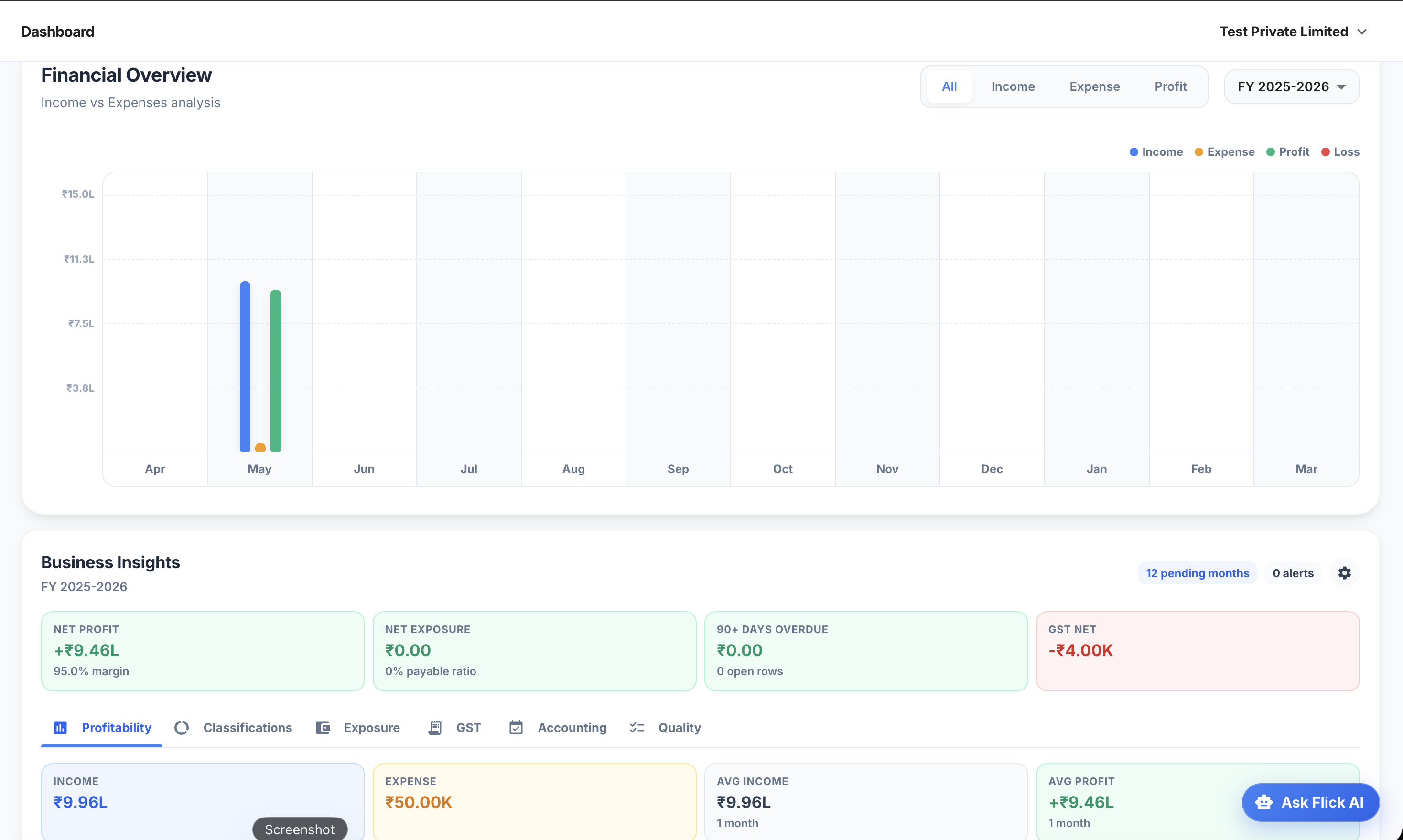
AI Accounting Software consolidates information on receivables, payables, cash flow, and expenses, giving founders and decision-makers faster access to the financial insights they need.
The practical test: can a founder answer "what is our current net cash position across all bank accounts" without making a phone call or waiting for a report? In traditional setups, almost always no. In AI accounting setups where reconciliation runs continuously, almost always yes.
Scalable Accounting Operations
Accounting automation software allows finance teams to handle growing transaction volumes and reporting requirements without proportionally increasing manual workload, making it easier to scale accounting operations efficiently.
To make this concrete: a business growing from 200 to 800 monthly transactions in traditional accounting typically needs to increase CA retainer costs by 3–4x or hire an additional finance resource. In an AI accounting setup, the same growth is absorbed by automation, the human review queue grows modestly (from 20 exceptions to 50–80), not proportionally with transaction volume.
GST ITC Accuracy
One of the least-discussed advantages of AI accounting software is its impact on Input Tax Credit accuracy. When invoices are manually entered, GSTIN details and HSN codes are frequently incomplete or incorrect which means ITC is claimed on insufficient documentation. AI invoice processing that captures GST fields from source documents at the point of entry significantly reduces the risk of ITC reversals and GSTN notices.
When Traditional Accounting Is Still the Right Choice
The goal of this comparison isn't to argue that every business should switch to AI accounting software. For many businesses, it genuinely isn't necessary yet. Traditional accounting with a good CA firm is appropriate when:
Monthly transactions are under 100–150 across all channels
The business has a single bank account and one primary payment method
GST compliance is straightforward (single rate, primarily B2C)
Reporting requirements are limited to annual statutory filings
The business is pre-revenue or in the earliest stages with minimal financial complexity
Making the Transition: What Moving From Traditional to AI Accounting Actually Involves
What doesn't change
Your CA relationship doesn't change. Your statutory compliance requirements don't change. Your need for human review and judgment doesn't change. AI accounting software handles the data processing layer. The accounting expertise and compliance knowledge your CA and finance team provide remains essential.
What changes immediately
The daily data entry workflow changes. Instead of manually entering invoices, reconciling bank statements, and updating AR/AP spreadsheets, the finance team's primary activity shifts to reviewing exceptions and approving categorizations.
What takes 4–8 weeks to fully realize
The reporting improvement depends on having 4–6 weeks of processed data. In the first month, the AI is learning your vendor patterns and categorization preferences. By month 2–3, exception rates drop from 15–20% of transactions needing review to 5–8%. Plan for a parallel-run period of 4–6 weeks before fully transitioning.
What your CA needs to know
Talk to your CA before switching about what format they need for compliance work: Tally import file, trial balance format, specific ledger groupings. Getting this right at setup prevents a situation where AI accounting runs cleanly internally but produces outputs your CA can't use for statutory compliance.
Common transition mistakes
The most common mistake: treating AI accounting software as a full bookkeeper replacement before it's been trained on your business. For the first 6–8 weeks, it needs more oversight than it will at steady state. Treat the first 2 months as supervised automation — high oversight, gradual handoff.
Product proof
Screens from the Flick AI workflow
.png)
Common Signs Your Business Has Outgrown Traditional Accounting
As operations grow more complex, traditional accounting workflows can become difficult to manage efficiently. If any of the following sound familiar, it may be time to explore accounting automation software.
Month-end close consistently takes more than 5 working days — not occasionally, but as the norm for 3+ consecutive months
Bank reconciliations are running 2–3 weeks behind, meaning you're reconciling last month while this month's transactions accumulate
Financial reports are being requested more than once a quarter and each preparation takes more than 3 working days
You're maintaining 3 or more separate spreadsheets for information that should live in one system
You have 4 or more active payment channels with no automated way to reconcile them
Finance team member spends more than 3 hours per day on data entry and reconciliation rather than analysis
A founder asked "what's our current cash position?" and the answer required more than 30 minutes to produce