Where GST reconciliation starts
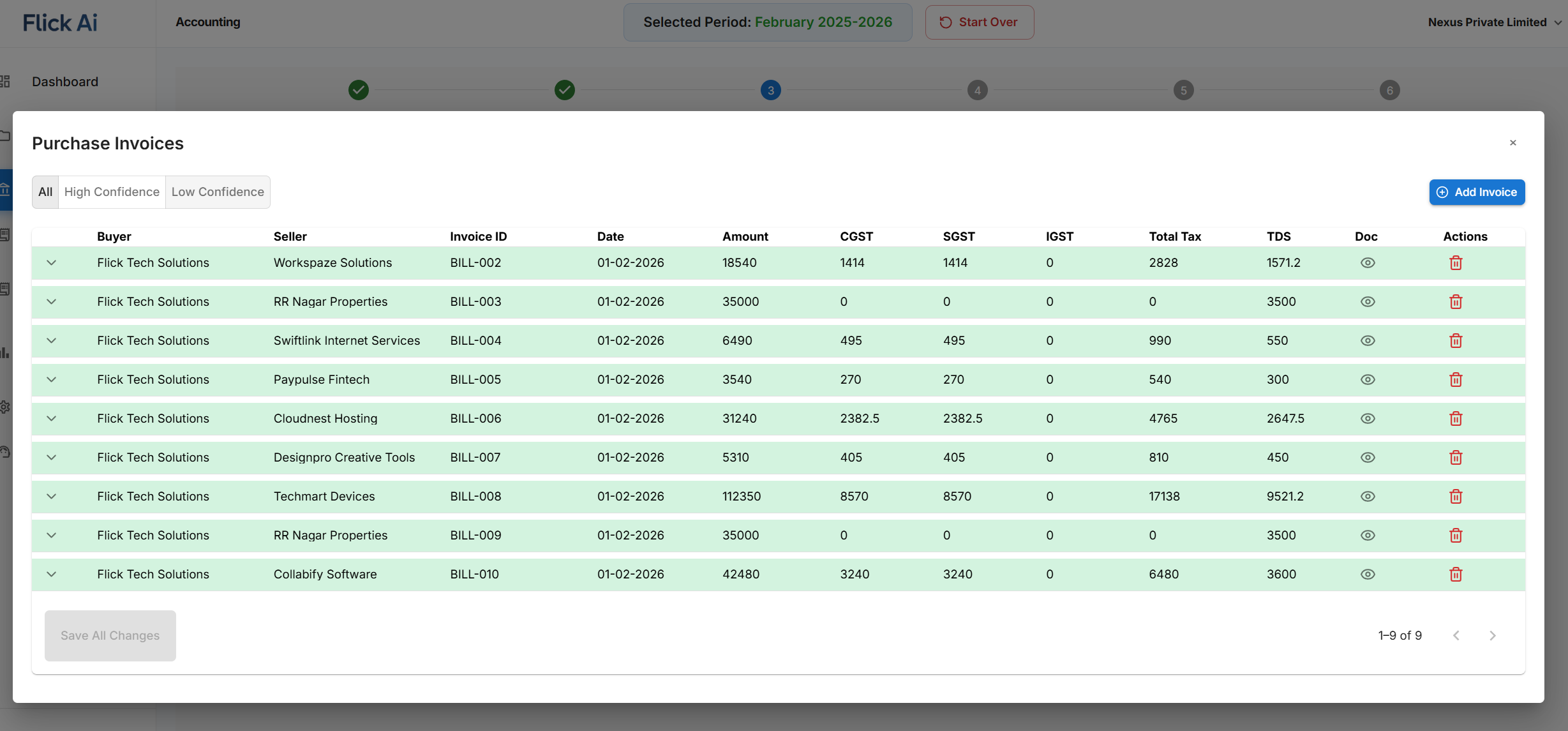
GST reconciliation starts with accurate invoice records. If invoice data is incomplete or scattered, review becomes slower.
- Invoice number and date
- Party details
- Taxable value and GST amount
- Accounting treatment
GST Guide
AI can support GST reconciliation by improving the quality of invoice data, matching records with payments, and preparing cleaner reports for review.
Published 18 Feb 2026 · Last updated 25 May 2026
GST reconciliation starts with accurate invoice records. If invoice data is incomplete or scattered, review becomes slower.
AI helps by extracting invoice fields, organizing documents, matching payments, and reducing repetitive checks before final advisor review.
Best Fit
Flick AI is not trying to be a heavy inventory ERP. It is built for invoice-led businesses and the professionals who serve them: teams where monthly accounting is mostly documents, bank transactions, reconciliations, ledgers, and financial reports.
Flick AI is best suited for service businesses, consultants, agencies, SaaS companies, professional firms, and other teams that raise and receive invoices every month but do not need heavy inventory accounting.
For CAs and finance consultants serving non-inventory-led customers, Flick AI gives a repeatable monthly workflow for document collection, invoice parsing, reconciliation, ledger review, and report preparation.
The goal is simple: founders should focus on business through the month, then spend roughly 1-2 focused hours reviewing bookkeeping and cleaning financial sheets instead of chasing accounting tasks every week.
Product Workflow
This resource focuses on gst reconciliation with ai. For the complete step-by-step workflow, see the main Flick AI guide covering upload, parsing, reconciliation, ledger review, and reports.
Read the full workflowProduct Proof
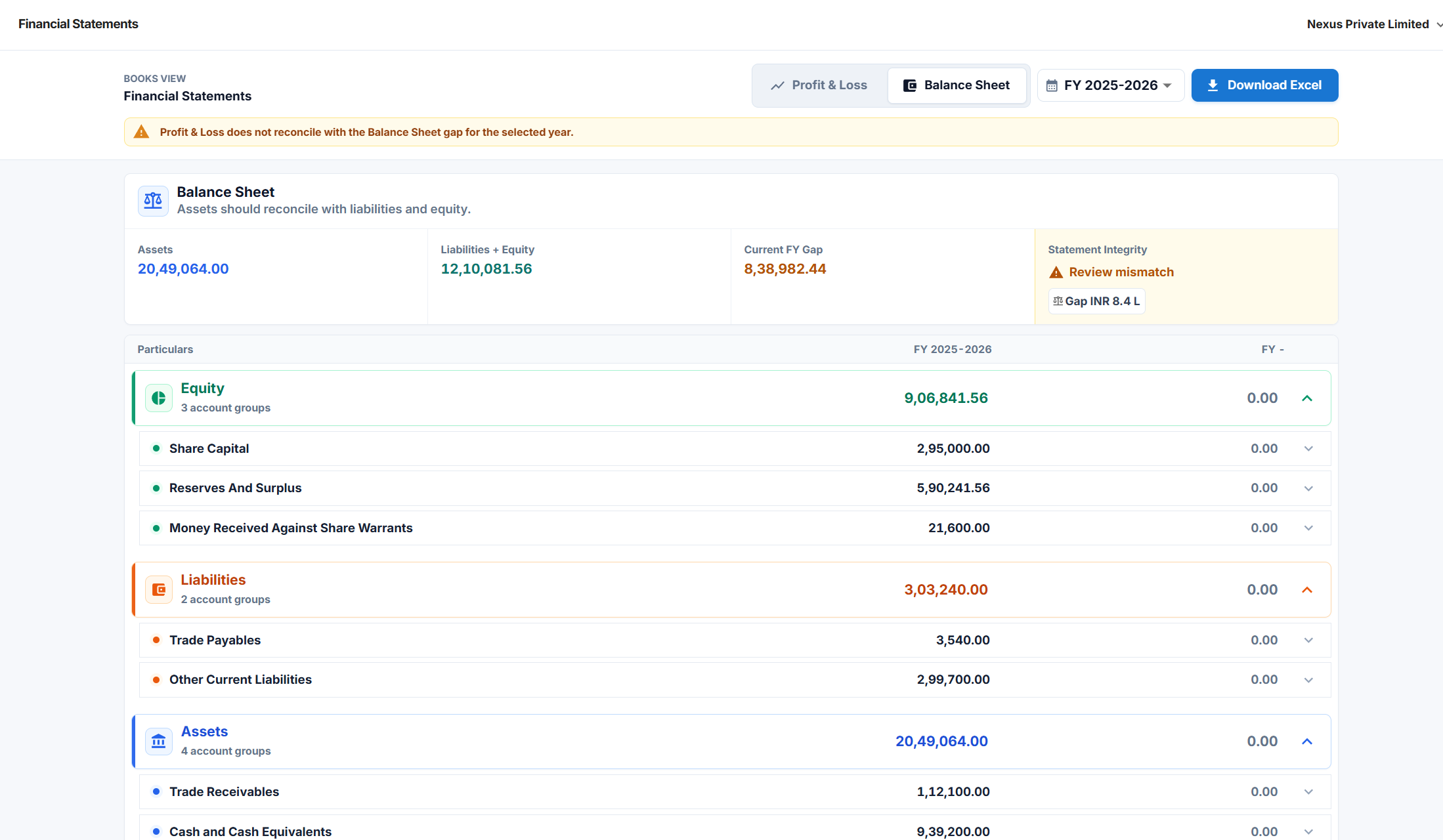
GST reconciliation depends on accurate invoices, matched payments, and traceable reports. These screens show the checkpoints Flick AI gives teams before final compliance decisions.
Key Capabilities
Clean source records make GST review easier.
Connect invoices and payments before review.
Prepare records for founder and CA review.
| Area | Risk if manual | AI support |
|---|---|---|
| Invoice fields | Typing errors | Extraction support |
| Payment status | Missed matches | Bank matching support |
| Ledgers | Wrong treatment | Suggested categories |
| Reports | Late review | Processed accounting records |
FAQ
This guide focuses on reconciliation support. Final filing should follow the required GST process and advisor review.
Yes. Flick AI includes GST and TDS reconciliation support in its accounting workflow.
Indian startups, consultants, agencies, SMEs, and finance teams with recurring invoice and bank reconciliation work can benefit.
Try Flick AI
Start with a 14-day free trial or book a demo to see how Flick AI handles invoice parsing, reconciliation, GST/TDS support, and reports for Indian businesses.
.png)